What MyVentra will do
Built around how a round really runs: regular visits, extras on the day, money that doesn’t always arrive on time, and figures for the taxman at the end of the year. Here’s what’s in it so far, with more improvements on the way.
The diary
- Weekly, Daily and Monthly views. The Weekly view starts on today and shows overdue visits in their own column.
- Colours tell you at a glance what's to do, done but unpaid, and paid. Hover over a visit to see the customer, address, price and their account.
- Drag a visit to another day, or move a whole day at once.
- Skip a visit with a reason, and it moves to the next date in that customer's repeat.
- Your days off are never booked. A holiday shift moves everything still to do forward by the weeks you choose.
Your round and routes
- Your round order is set from postcodes and streets to start with, then changed by hand or by dragging.
- Each day's visits follow your round, on screen and on printed day and week sheets.
- Open the day's visits as a route in Google Maps, starting from your business address. Busy days are split into parts.
Customers
- Full records: address, phone, email, usual price, repeat in weeks or months, or a one-off job.
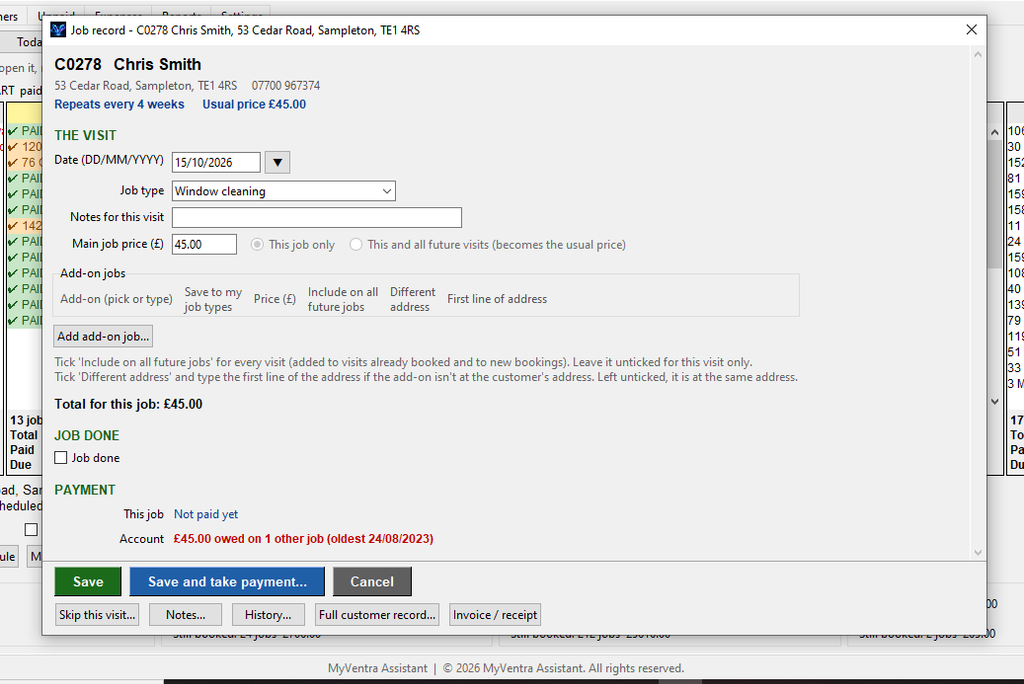
- Extra work such as gutters or conservatory roofs, for one visit or every visit, even at a different address.
- Total spend, average gap between visits, last and next clean, and one clear account balance.
- Quotation customers with printed estimates. Accept the quote and the first visit is booked.
- A History box showing every job and every payment, linked together.
Payments and debts
- The payment box shows the whole account, so you can settle one job or everything owed.
- Part payments, tips, money paid in advance and bad debts written off, all kept separate and correct.
- Each customer's usual payment method is remembered.
- The Unpaid tab lists every debt with each customer's total owed.
- Reminders open an email or copy a text for you to send. Nothing is ever sent without you.
Invoices and paperwork
- Invoices and receipts with your logo, business details, PO number and payment terms.
- One combined invoice for everything a customer owes.
- Customer statements, estimates, day sheets and week sheets.
- Print anything, save it as a PDF, or export to Excel.
Money and tax time
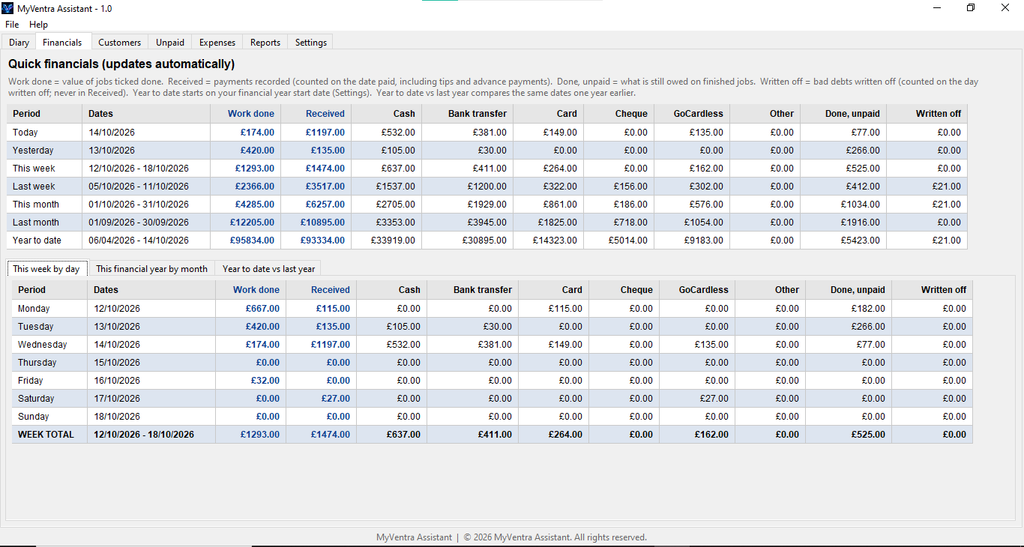
- Financials by day, week, month and year to date, split by payment method, with this year against last year.
- Expenses sorted into categories that follow HMRC's headings.
- Profit and loss on a cash basis and a work-done basis.
- A quarterly summary laid out for Making Tax Digital.
Keeping your data safe
- An automatic backup every day, keeping between 7 and 365 days' worth.
- A safety backup before any big change, such as deleting a customer or moving your days off.
- Back up data now, to a USB stick or cloud storage folder.
- A tidy-up that removes cancelled customers with no activity for six years, after showing you exactly what will go.
The money and tax reports are summaries of the records you enter, to help you and your accountant. They aren’t tax advice and they aren’t a submission to HMRC.
What you’ll need
A Windows PC. MyVentra is a single program file, so there’s nothing else to install and it works without an internet connection. Google Maps routes and emailing reminders use your browser and email program when you choose to open them.
MyVentra is still being finished, so details may change before launch.